All reseller tools in one place
What this page is for
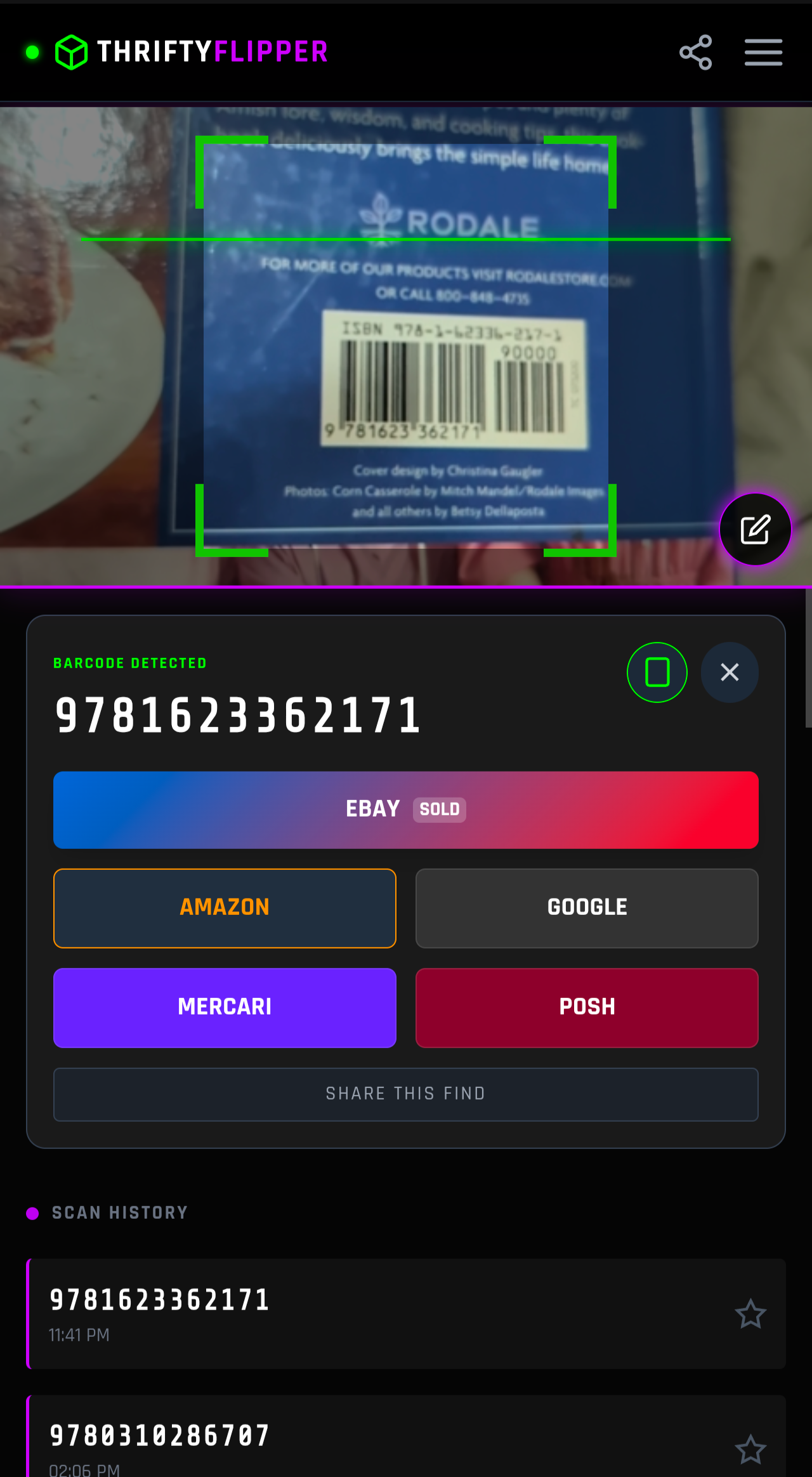
Thrifty Flipper is a free, browser-based scanning and arbitrage tool: you point a phone camera at a barcode, it pulls real eBay sold prices, then it subtracts fees, shipping and your cost so you know the net profit before you buy. There are 34 pages on this site and each one owns exactly one job. This page is the index: find the job you are doing right now, then open the page that owns it.
If you are brand new, start with the barcode scanner for resellers. If you already have an item in your hand and want the math, open the eBay fee calculator. Everything else is a narrower version of one of those two jobs.
Scanning: get a price in seconds
The scanner pages all do the same core thing, and differ by where you are standing when you do it.
| Page | Use it when |
|---|---|
| Free reseller scanner app | You want the plain camera scanner with no setup. |
| Barcode scanner for resellers | You want the full walkthrough of what happens between the beep and the price. |
| Manual barcode entry app | The label is torn, faded or missing and you have to type the number. |
| UPC vs EAN for resellers | The barcode will not scan and you need to know why. |
| Retail arbitrage app | You want to know what the app does and does not do before you trust it in a store. |
Calculators: decide whether the flip is worth it
Most resellers lose money on fees they never priced in. These pages cover the arithmetic.
| Page | Use it when |
|---|---|
| eBay fee calculator | You need final value fees, per-order fees and net payout for one item. |
| Arbitrage calculator | You want net profit after cost, shipping and fees in one screen. |
| Compare eBay fee calculators | You are picking a calculator and want the differences side by side. |
| Retail arbitrage margin calculator guide | Your margin is fine on paper and still thin in practice. |
| Amazon to eBay arbitrage tool guide | You are sourcing on Amazon and selling on eBay. |
Apps and software: what the paid tools charge
Paid scanning apps are built for high volume. If you are scanning fifty items a week, this is the difference between a free tool and a subscription.
| Page | Use it when |
|---|---|
| Best apps for retail arbitrage | You want the paid and free options compared in one place. |
| eBay arbitrage software | You are deciding between a browser tool and installed software. |
| Keepa alternative for arbitrage | You mainly want price history and rank, not scanning. |
| ScoutIQ alternative free | You are weighing a paid subscription against a free scanner. |
| Profit Bandit alternative | You used Profit Bandit and it no longer fits. |
| Amazon seller app alternative | You sell on Amazon and eBay and want one workflow. |
| Tactical Market comparison | You are comparing marketplace data providers. |
| Thrifty Flipper vs Flippr | You are comparing two free scanners. |
| Free eBay arbitrage tool | You want the free path and nothing else. |
| Free Reselling Revolution | You want the free-reselling angle. |
Stores and sourcing: what to expect where you shop
| Page | Use it when |
|---|---|
| Best stores for retail arbitrage | You are deciding which store is worth the drive. |
| Thrift store scanner | You source at thrift stores. |
| Goodwill scanner app | You source at Goodwill. |
| Flea market scanner app | You source outdoors and have no signal. |
| Garage sale scanner app | You source from driveways and estate sales. |
| What is retail arbitrage sourcing | You want the plain definition first. |
Value by category: prices that hide from generic scanners
| Page | Use it when |
|---|---|
| Barcode price checker | You want the base price check before category detail. |
| Video game value checker | You are looking at games, consoles or accessories. |
| Book scanning app arbitrage | You are looking at books and ISBNs. |
| Clothing reseller app guide | There is no barcode, only a tag. |
| Shoe reseller price checker | You are looking at shoes and sneakers. |
Guides and strategy
| Page | Use it when |
|---|---|
| Online arbitrage vs retail arbitrage | You are choosing a sourcing model. |
| Amazon FBA scanner guide | You sell through FBA. |
| Google Lens for reselling | The item has no barcode at all. |
Three rules before you buy anything
- Check sold prices, not asking prices. A listing price is a hope; a sold price is a fact.
- Price the fees first. eBay takes a final value fee plus a per order fee, and shipping is yours when you get it wrong.
- Trust the scan, verify the condition. A scanner reads a barcode, not the scratches.
What Thrifty Flipper does not do
It is not a repricer, it does not auto-list, and it does not buy anything for you. It is a free browser tool: no account, no install, no subscription. Paid apps in this space cost around 9.99 to 44 dollars a month, which is why the free tier matters when you are starting out.
Frequently asked questions
Is Thrifty Flipper free?
Yes. There is no subscription and no account. The tool runs in the browser on a phone, tablet or desktop.
Does it need an eBay account?
No. You scan a barcode and the tool shows sold market data. You only need an eBay account when you actually list the item.
Does it work on an iPhone?
Yes, it runs in Safari and Chrome on iOS, on Android, and on desktop browsers. It installs to your home screen like an app.
Is it on Google Play?
Yes, there is a Play listing for the TheThriftyDev build with 50 or more installs, and the browser version always has the newest features.
Next steps
Keep going from here: reseller scanner barcode scanner for resellers manual barcode entry app.